
Article

Local AI agent: on your own computer or on a server

A local AI agent is one that runs on your hardware rather than at a service. People mean two different things by it: a local model, when the neural network itself runs on your computer, and a local harness, when the agent program, files and memory live with you while a cloud model such as Claude or GPT does the thinking. An agent that works around the clock needs a computer that stays on, so it usually goes on your own server (VPS), about 1,500 RUB a month, rather than a laptop.

Updated October 21, 2026·7 min read
In the evening Neko closes her laptop, while a robot cat with a phone sits on a running home server and keeps working

What “local AI agent” means

An AI agent consists of a model that thinks and a harness that acts: reads files, keeps memory, sends messages and works on a schedule. More on this in How AI agents work. “Local” can refer to either part.

  • Local model. The neural network is downloaded and runs on your computer. Texts go nowhere, but you need a powerful machine, and the model is usually weaker than cloud ones.
  • Local harness. The agent program, its files, memory and tools are with you, and for answers the agent calls a cloud model: Claude from Anthropic or GPT from OpenAI.

When people search for “AI agent on PC” or “AI assistant on PC”, they usually mean the second: an agent that works with their files and programs and keeps memory with them. The fully local option with a model on your own hardware is chosen less often, when texts must never leave the computer at all.

A local model: what you need and what it costs you

Open models can be downloaded and run at home. Then you pay nothing per request, and not a single word goes to a third-party company. In exchange you get three limitations.

  • Hardware. A model that reliably handles multi-step tasks needs a powerful GPU with lots of memory. An ordinary laptop fits only small models.
  • Quality. Small models make noticeably more mistakes in tasks with tools: they mix up steps and fail to finish. For an agent this matters more than for a chat, because it acts on its own.
  • Upkeep. Downloading the model, tuning settings, updating it and looking after the computer is on you.

This option suits you if you already have a powerful computer, enjoy tinkering and your texts cannot be sent outside for work reasons. For an everyday assistant for personal and business tasks it is rarely chosen.

A local harness with a cloud model

This is the most common option. The harness is Claude Code, Codex, OpenClaw or Hermes Agent, and the model runs in the cloud by subscription or via the API. You keep the files and memory. The model only gets what the agent showed it for the current step.

  • Model: in the cloud

    Claude or GPT. Receives the task text and whatever the agent showed it for the current step: an email, a note, part of a file.

  • Harness: with you

    The agent program runs on your computer or server and carries out the model's decisions: opens files, runs commands, writes messages.

  • Memory: with you

    Notes about people, agreements and decisions lie as files next to the agent. You can open and edit them by hand.

  • Files: with you

    The agent reads documents, spreadsheets and archives in place. They are not uploaded to the cloud in full.

  • Channel: Telegram

    You write to the agent by text or voice from anywhere, it answers and sends summaries itself.

NekoAgent works this way too: the Claude Code or Codex harness on the client's server, the model on their Claude or ChatGPT subscription, and memory in an Obsidian knowledge base on the same server.

Why a laptop is a poor home for an agent

You can install an agent on your laptop, and for a first look that is enough. The problems start when the agent has to work every day.

  • A laptop sleeps. Close the lid and the agent stops: the morning summary and the evening reminder will not arrive.
  • A laptop travels with you. On the road, without a charger or without internet, the agent is unavailable exactly when you write to it from your phone.
  • Updates and restarts. The system restarts when it suits it, and the agent stays off until someone starts it again.
  • Access to everything. On your work computer the agent has your personal files, a browser with passwords and your email at hand. On a separate machine it is easier to decide what it may touch.
  • Load. The agent takes memory and CPU while you work on the same computer.
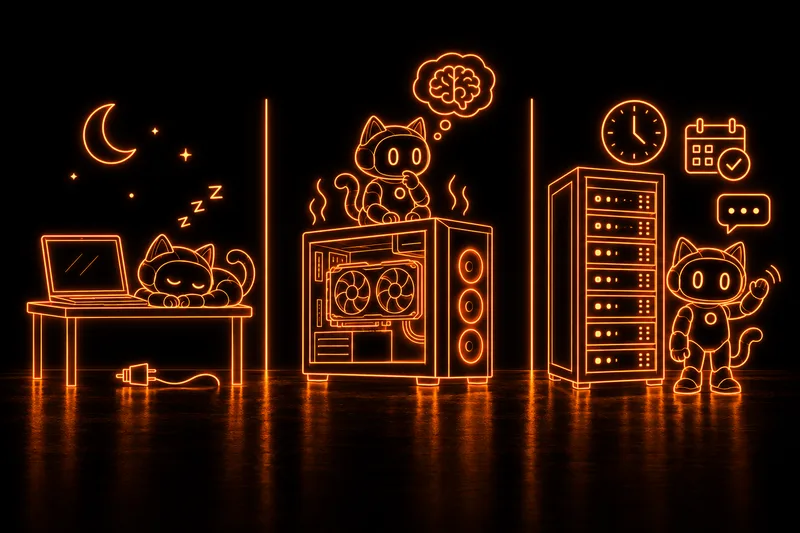
Three places for an agent: at a laptop with its plug pulled the robot cat sleeps; at a powerful computer with a GPU it ponders a local model; at a server rack with a clock and a calendar it waves a paw cheerfully
A laptop sleeps, a powerful computer is needed for your own model, a server works around the clock.

That is why an agent that works every day goes on a separate computer that never switches off. The easiest is to rent a server (VPS): with 2 GB of RAM it costs about 1,500 RUB a month. An agent on such a server stays local in the harness sense: the server is yours, and the data lives on it.

Where a local agent's data is stored

The key question for any agent is where your files and memory live and who sees the texts. Let us compare four options.

Chatbot in a browserCloud builderAgent on a laptopAgent on your own server
Where files and memory liveWith the serviceWith the platformOn the laptopOn your server
Who sees the textsThe serviceThe platform and the modelThe model, if it is in the cloudThe model, if it is in the cloud
Works at nightNo, waits for a questionYesWhile the laptop is onYes, around the clock
Writes firstNoBy scenarioWhile the laptop is onYes, on schedule
Who fixes itThe serviceThe platformYouYou or a support service

If texts must never leave your hardware, a local model with all its limitations is what remains. In all other cases your own harness on your own server gives you the essentials: memory and files stay on your server, and the agent works while you sleep.

Which option to choose

  • You want to try an agent over a weekend

    A harness on your laptop, the model by subscription
  • Texts cannot leave your hardware, and you have a powerful computer and time for setup

    A local model on your own hardware
  • You need the agent every day and on a schedule

    Your own server (VPS): DIY with OpenClaw or Hermes, or a ready-made turnkey agent

Paths with timelines are covered in How to create your own AI agent, types of agents are compared in Which AI agent is best, and what can be free in an agent in Free AI agents. In NekoAgent we do the first install together on a call with a curator: we connect your server, subscription and Telegram, about two hours. After that, during paid support Iris monitors the agent around the clock and helps bring it back after failures (reasonable efforts, no guaranteed response time), makes nightly encrypted backups and ships tested updates you install with one button.

Let's put an agent on your server

Plans from 24,900 RUB for three installs. The first one is on a call with a curator, with training.

Key questions

What is a local AI agent?

An agent that runs on your computer or server rather than at a service. The model can be local, when the neural network runs at your place, or the harness, when the agent program, files and memory are with you and a cloud model does the thinking.

Can I run an AI agent on my own PC?

Yes, and for a first look that is enough. But the agent works only while the computer is on, so for daily work and scheduled tasks it goes on a server that never switches off.

Do I need a powerful GPU for a local AI agent?

Only if you want to run the model itself at home. If the agent calls Claude or GPT in the cloud, an ordinary server is enough: a VPS with 2 GB of RAM costs about 1,500 RUB a month.

Where does my data go if the model is in the cloud?

The model receives the task text and whatever the agent showed it for the current step. Files, chats and memory are stored where the harness is. With NekoAgent that is the client's server and the Obsidian knowledge base on it.

Why is a server better than a home computer?

A server does not sleep, does not travel with you and does not restart without asking, so the agent on it is available around the clock and runs scheduled tasks. And your work computer keeps only your own affairs.


More articles

Neko assembles an AI agent from parts: a model, a server, Telegram and a knowledge base
Article · 8 min

How to create your own AI agent: DIY or turnkey

Your own AI agent needs four things: a model, a harness that gives the model memory and tools, a server where the agent runs around the clock, and a channel to talk to it, usually Telegram. You can put this together in a no-code builder, by hand from open source, or turnkey. Here is what each path costs in money and time.

Read the article
  • What an agent is made of
  • Three paths compared
  • Monthly cost
  • Turnkey, step by step
Neko weighs free software on a scale against a server, a model and time
Article · 6 min

Free AI agents: what is really free and what you pay for

The only free part of an AI agent is the software: OpenClaw and Hermes Agent are open source. The server that keeps the agent running around the clock and the model that does its thinking always cost money, and you pay for installation and upkeep with your time. The free tier of ChatGPT or Claude gives you a chat assistant, and you cannot build an agent out of it.

Read the article
  • What is free and what is not
  • Free ChatGPT vs an agent
  • OpenClaw and Hermes
  • Monthly costs
Neko examines a transparent robot cat through a magnifying glass; inside are the model, tools, memory and schedule
Article · 6 min

How AI agents work: explained in plain words

An AI agent is a language model that has been given tools, memory and a schedule. The model decides what to do, and a harness program carries out its decisions: reads files, sends messages, runs commands on a server. The agent works in a loop: it gets a task, makes a plan, takes a step, checks the result and decides what comes next.

Read the article
  • What an agent is made of
  • The work loop
  • How an agent remembers
  • Where agents go wrong
Neko at a desk between two robots: the assistant holds a speech bubble, the robot cat agent heads off to work with letters, an alarm clock and a key
Article · 6 min

AI agent vs AI assistant: the difference and which to choose

An AI assistant answers questions in a chat: you ask, it writes an answer, and you do the rest. An AI agent does the whole job: it works with email and files, remembers people and agreements, acts on a schedule and messages you first. The same model does the thinking for both; what differs is what is built around it.

Read the article
  • What the difference is
  • A comparison table
  • One task, two approaches
  • What to choose
Neko on a balcony records a voice message, and the robot cat agent writes her words into a glowing notebook
Article · 7 min

How to set up an AI agent: the first two weeks

Setting up an AI agent means telling it about yourself and your work, giving it simple first tasks and correcting it in words when it gets something wrong. All of this happens in an ordinary Telegram chat, without code. The agent writes what you say into memory, so every week it asks less and does better. Below is a plan for the first two weeks.

Read the article
  • What to tell it on day one
  • First tasks
  • How to correct the agent
  • Scheduled tasks
Neko in a bright workshop compares four robot agents on a table, a robot cat among them
Article · 7 min

Which AI agent is best: types of agents and how to choose yours

There is no single best AI agent for every case: agents come in four types, and each suits its own owner. They are cloud builders, the open-source agents OpenClaw and Hermes, your own agents on Claude Code or Codex, and ready-made turnkey agents. You choose by five questions: where the data lives, who fixes it, what it costs per month, whether it works in Telegram and which AI subscription it accepts.

Read the article
  • Four types of agents
  • Five questions to choose by
  • A comparison table
  • What to ask before buying
Neko in a bright office hands a stack of tasks to a robot cat sitting at its own desk with a laptop and a badge
Article · 7 min

AI employee: what it does, where a human is needed and what it costs

An AI employee is an AI agent given part of your regular work: correspondence, reminders, documents, summaries and reports. It works around the clock on a server, remembers people and agreements and runs tasks on a schedule. Money, promises to clients in your name and decisions with a high cost of error stay with a human. Per month an AI employee costs a server of about 1,500 RUB, an AI subscription and support.

Read the article
  • What the agent covers
  • Where a human is needed
  • Monthly cost
  • How to set tasks
In a small coffee shop Neko takes one sticky note with a task off a board and hands it to a robot cat holding a stopwatch
Article · 7 min

Implementing AI agents in a small business: a one-month plan and how to measure the gain

You can implement an AI agent in a small business within a month and without a separate project. Take one repeating routine, install the agent, spend two weeks fine-tuning it in ordinary chat and count how many hours a week it takes off your plate. No spec or integrations are needed at the start: an agent in Telegram only needs your explanations and access to the right files. Each month it costs a server of about 1,500 RUB and an AI subscription.

Read the article
  • The first routine
  • Two weeks of fine-tuning
  • How to measure the gain
  • Implementation mistakes
Neko types commands in a terminal in the evening, while a robot cat next to her studies an unfolded manual over an open box of parts, puzzled
Article · 7 min

Hermes Agent: what it is, how to install it and what you maintain yourself

Hermes Agent is a free, open-source AI agent from Nous Research under the MIT license. You install it on your computer or server, connect a model and a messenger, and it carries out tasks, keeps memory of past conversations and creates skills from solved tasks on its own. Installation is one terminal command or the Hermes Desktop app for Windows and macOS, followed by the “hermes setup” command. The software is free, while the model, the server and the upkeep stay with the owner.

Read the article
  • What Hermes can do
  • Installation step by step
  • Which models fit
  • What you maintain yourself
Neko works in AdsPower in the evening: the monitor shows a list of browser profiles, and the robot cat next to her points a paw at one of the rows
Article · 8 min

AdsPower: what this browser is and how to set up a profile and proxy

AdsPower is an antidetect browser: every profile has its own cookies, browser fingerprint and proxy, and websites see the profiles as different devices. That lets you run client accounts, team access and test accounts on one computer without mixing them up. AdsPower runs on Windows, macOS and Linux, two profiles are free forever, and you bring your own proxies: HTTP, HTTPS, SOCKS5 or SSH.

Read the article
  • What AdsPower is
  • A profile in five steps
  • Which proxies to pick
  • Common mistakes
Neko plugs a cable into a small home server in the evening, wires run from it to colourful chat bubbles, a robot cat sits on the server holding a padlock, and a red toy lobster stands nearby
Article · 8 min

OpenClaw: what it is, how to install it and connect Telegram

OpenClaw is a free, open-source AI assistant under the MIT license. It runs on your computer or server and answers in the messengers you already use: Telegram, WhatsApp, Discord, Slack, Signal and others. Installation is one terminal command, then a setup wizard connects the model, which takes about five minutes according to the docs. The software is free, while the model, the server, updates and security stay with the owner.

Read the article
  • What OpenClaw can do
  • Installation step by step
  • Telegram and a Claude subscription
  • What you maintain yourself
Neko on a sofa in the evening with her phone compares two helpers on the table: a plain grey bot waits with a single message bubble, while a robot cat juggles a calendar, an email, a document and a reminder
Article · 7 min

AI bot for Telegram or an AI agent: the difference and which to choose

An AI bot for Telegram is a bot that passes your message to a neural network and sends its answer back to the chat. An AI agent in Telegram looks the same but works differently: it lives on a server, remembers people and tasks, works with your files and email and messages you on a schedule. To ask, translate or draft a text, a bot is enough. To run your affairs every day, you need an agent.

Read the article
  • What an AI bot in Telegram is
  • How an agent differs from a bot
  • Comparison and prices
  • When a bot is enough
Neko at a workbench in the evening compares two glowing cores, orange and teal, while a robot cat with an open chest hatch waits next to her for one of them
Article · 7 min

Claude Code or Codex: which engine to choose for a personal AI agent

Claude Code by Anthropic and Codex by OpenAI are two harnesses that turn a model into an agent: they give it files, commands and tools on a server. For a personal agent the main choice between them is the subscription: Claude Code runs on a Claude Pro or Max plan, Codex on a ChatGPT plan, in a server terminal from Plus and up. The agent's memory, Telegram and schedule do not depend on the engine, and in NekoAgent you can switch the engine later right from the chat.

Read the article
  • What Claude Code and Codex are
  • Which subscription you need
  • How they differ day to day
  • Can you switch engines
Neko in a bright loft writes an instruction card and hands a finished glowing card to a robot cat holding an open card file with colored tabs
Article · 7 min

Claude Code skills: how to teach an AI agent a new task

A Claude Code skill is a folder with a SKILL.md file: a short description of when it is needed and step-by-step instructions. The agent sees the descriptions of all its skills and opens the right one by itself when a task matches the description, reading the full text only at that moment. This way you teach the agent a recurring task once, such as replying to a review or a weekly report, and never explain it again. Codex by OpenAI understands the same format.

Read the article
  • What a skill is
  • How the agent picks a skill
  • Business examples
  • Skills and plugins
Neko relaxes in an armchair with a tablet while a robot cat sorts letters into trays on its own and shows her a card with a question mark and a green check; a low glass barrier glows next to the desk
Article · 7 min

Autonomous AI agents: what an agent does on its own and when it asks a human

An autonomous AI agent performs tasks without a command for every step: on a schedule and by the rules you gave it. It sends summaries and reminders, prepares drafts, records decisions in its memory and messages you first. Money, messages to people on your behalf and deleting data are best kept subject to your confirmation, even for an autonomous agent. Limits are set in two ways: with rules in your chat with the agent and with the access you give it.

Read the article
  • What the agent does alone
  • When it asks a human
  • How to set limits
  • Several agents
Neko in her kitchen in the evening looks at a chat message on her phone; a robot cat on the counter holds a glowing card with a bell and a checklist; on the fridge are a calendar with circled dates, a child's drawing and a shopping list, next to a grocery bag and a folder of documents
Article · 7 min

Personal AI assistant: errands, family and reminders in one chat

A personal AI assistant is an agent that runs your errands in Telegram: it remembers agreements, dates and documents, reminds you about them on its own and takes tasks by text or voice. It differs from an AI chat on your phone in two ways: it has a lasting memory about you and it messages you first when a deadline approaches.

Read the article
  • What to give the assistant
  • How it differs from a chat
  • An assistant for the family
  • Personal data